

Picking a Shopify theme is one of the first real decisions you make on Shopify, and it stays with you much longer than most people expect. Your Shopify theme decides how your products look, how fast your pages open, how easy small edits feel and even how many apps you end up paying for every month.
In my work with Shopify brands at ControlF5, I see both sides. Some brands do really well on a free Shopify theme for years. Some buy an expensive paid Shopify theme and use only a small part of it. And some stay on a free Shopify theme for so long that they keep adding apps and custom code just to get features a paid Shopify theme would have given them on day one.
So the free vs paid Shopify themes question is not really about price. It is about what your Shopify store needs today and what it will need once it starts growing. Here is how I look at it when a brand asks me for advice.
A Shopify theme is the design layer of your Shopify store. It controls the layout, fonts, colors, menus, product pages and the sections you see on each page.
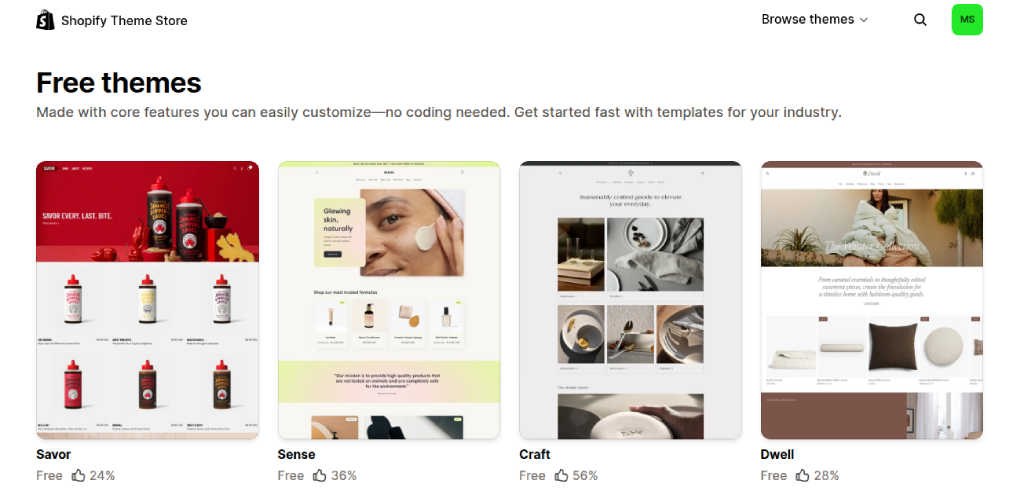
Free Shopify themes are made by Shopify itself and cost nothing to use. Dawn has been the default free theme for years, and Horizon is the newer free theme Shopify released in 2025, along with a family of free Horizon themes built on the same base.
All of these are Online Store 2.0 themes. That means you can add, remove and move sections on almost every page without touching code.
With a free Shopify theme, you get a clean design, a mobile friendly layout, a solid product page, collection filters and regular updates from Shopify. What you do not get much of are extra sections like look books or mega menus. Free Shopify themes are made to work for every type of brand, so they rarely have features made just for one kind of business, like a size chart for a clothing brand or a menu layout for a food brand.
Paid Shopify themes are built by independent Shopify theme designers, not by Shopify. Most of them cost between $150 and $400, and it is a one-time payment. Once you buy it, the Shopify theme is yours to use on your Shopify store with no monthly charge.
Here is what that money usually gets you:
I compare each of these with free Shopify themes in the next part, so you can see where the difference really matters.
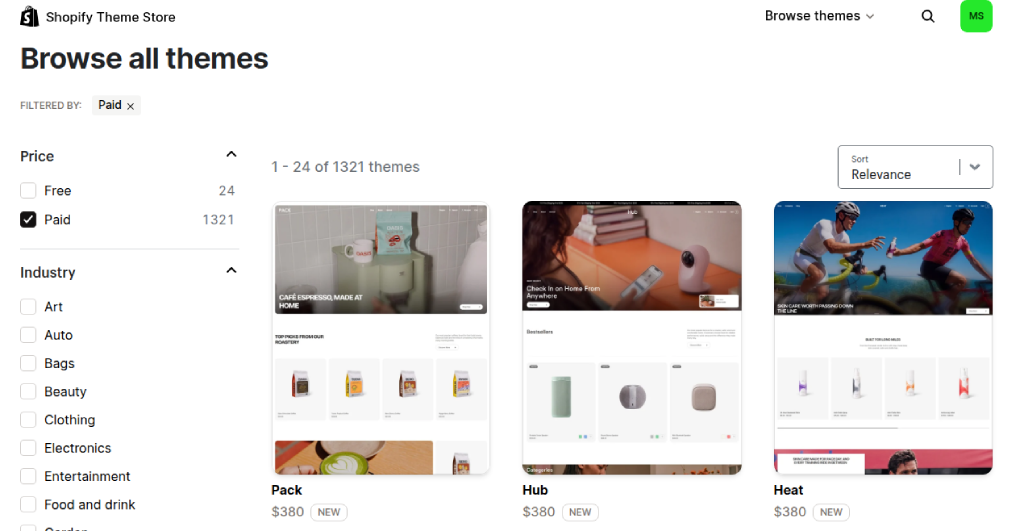
There are two main places to buy a paid Shopify theme. The first is the Shopify Theme Store, where every Shopify theme goes through Shopify’s review and updates come through your admin. The second is third-party marketplaces like ThemeForest, where themes are cheaper and there are many more designs to pick from.
The catch with third-party Shopify themes is that Shopify does not review them, so quality changes a lot from one seller to another. Updates are also not as simple. My honest advice is to stay with the Shopify Theme Store unless you have a developer who can check the Shopify theme code before you go live.
Before we get into details, here is a quick Shopify theme comparison you can use as a starting point.
| Point | Free Shopify theme | Paid Shopify theme |
| Price | $0 | One-time payment, mostly $150 to $400 |
| Made by | Shopify | Independent Shopify theme designers, reviewed by Shopify |
| Style presets | One or a few | Often several |
| Ready sections | Core sections only | More sections and special features |
| Support | Shopify support | Shopify theme designer’s support team |
| Updates | Free, from Shopify | Free updates for the Shopify theme you bought |
| Try before you pay | Not needed | Yes, free until you publish |
Free Shopify theme: You can change colors, fonts, images and the order of sections in the Shopify theme editor without code. But layout choices are limited, so many Shopify stores on free themes end up looking quite similar.
Paid Shopify theme: You get the same editor, plus more layouts and style presets to start from. This makes it easier to build a look that feels like your own brand without hiring a developer.
Which one wins: Paid, if a unique look matters to your brand. Free, if a clean and simple look is enough for now.
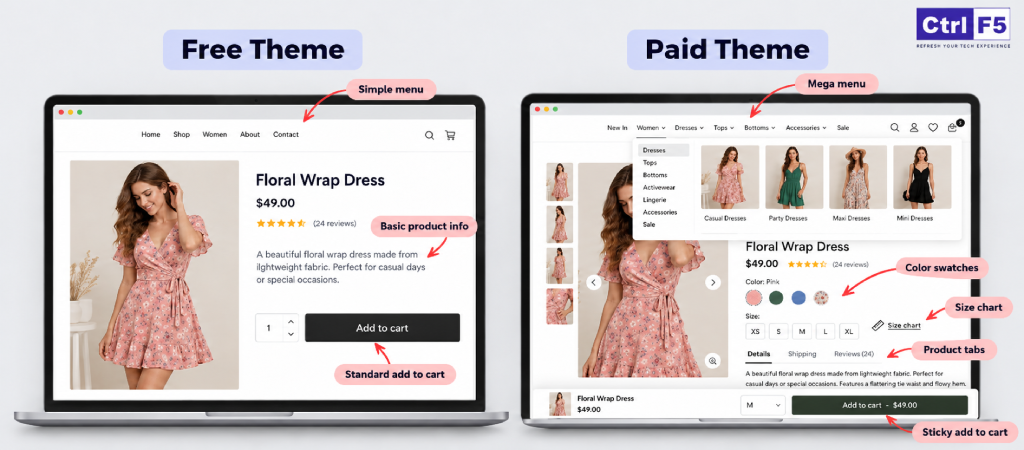
Free Shopify theme: You get the core Shopify theme features every Shopify store needs, like product pages, collection filters and a cart. Extras like mega menus, quick view, color swatches, size charts, sticky add to cart, product tabs and lookbooks usually need apps, and each app adds a monthly bill and its own code.
Paid Shopify theme: Many of these extras come built in. You simply switch them on from the Shopify theme editor without installing anything.
Which one wins: Paid, if you need many extras. When you compare Shopify theme features, count what you would have to add on top of a free Shopify theme, not just what the Shopify theme has.
Free Shopify theme: In any honest Shopify theme speed comparison, free Shopify themes do very well. They are built lean and follow Shopify’s own performance standards, so they load fast without much work.
Paid Shopify theme: Paid Shopify themes can be fast too, but they carry more code because they do more. If you switch on every slider, popup and animation, your pages will slow down.
Which one wins: Free, by a small margin. In my experience, heavy apps, large images and leftover code slow a Shopify store down more than the Shopify theme itself, as I explain in my blog on hidden causes of a slow Shopify store.
What about SEO? Page titles, meta descriptions, clean URLs and the sitemap come from Shopify, so they work the same on both. Shopify theme SEO only differs in the details a Shopify theme controls, like heading setup, image alt text support, product schema and speed.
A well built free or paid Shopify theme can handle all of these. If your pages are live but not showing up on Google, here are the common reasons your Shopify store is not ranking on Google.
Free Shopify theme: Help comes from Shopify support and its help center. Updates are free.
Paid Shopify theme: You get direct support from the designer who built the theme. Updates are free here too.
Which one wins: Paid, for support. With both, you install updates yourself, and any custom code may need to be copied over again.
Free Shopify theme: $0 to start. But if it needs four apps at $15 a month each to match a paid Shopify theme, that is $720 a year, plus developer hours for small changes.
Paid Shopify theme: Around $150 to $400 once, with fewer apps needed after that.
Which one wins: It depends on your Shopify store. The numbers above are only an example, so add up the Shopify theme, Shopify apps and developer hours, along with your Shopify plan cost, before you decide which one is cheaper.
Not sure your Shopify theme is worth what you pay for it?
My team can check your Shopify theme, apps and costs, and tell you if a switch makes sense.
I tell many new brands to start free, and I mean it. The best Shopify theme for you is not always the most expensive one. It is the one that fits your stage.
New Shopify store with a small catalog: If you are launching with 10 to 50 products, a free Shopify theme like Dawn or Horizon has everything you need. Your money is better spent on product photos, ads and your first few customers.
If you are still setting things up, my guide on building a Shopify store the right way will help you get the basics in place.
Testing a product or niche: When you are not sure yet whether a product will sell, do not put money into design. Launch on a free Shopify theme, run some traffic, and see what happens. If the product works, you can upgrade later. If it does not, you have lost nothing on the Shopify theme.
Shopify brands that want speed over heavy design: Some Shopify brands sell simple products where clear photos and a quick checkout matter more than fancy layouts. For them, a free Shopify theme kept light and clean is often enough for a long time.
Even design-focused niches can look good on a free Shopify theme when it is set up well. I have shared a few examples in my list of free Shopify themes for jewellery brands.
A paid Shopify theme starts making sense when your Shopify store has needs that a free Shopify theme cannot meet without extra apps or custom work.
Large catalogs and complex collections: If you sell hundreds of products across many categories, people need to find what they want in a few clicks. That means clear menus, good filters and collection pages that do not feel crowded. Paid Shopify themes made for large catalogs are planned around this from the start, while a free Shopify theme often needs extra work to handle it well.
Shopify brands that need strong visual storytelling: Fashion, beauty, home decor and premium brands often sell on feel as much as on product details. Their pages need big images, video and layouts that tell a story, not just a product grid. A paid Shopify theme gives you many more ways to do this on your own, without paying a developer to build each section by hand.
Shopify stores running many apps that a Shopify theme can replace: Open your Shopify admin and list the apps you pay for that only add small design features. Then open the feature list of a paid Shopify theme you like and tick off how many of those apps it would replace. If the answer is most of them, the switch can pay for itself within a few months.
The price of a Shopify theme, free or paid, is only one part of what it costs you. Once your Shopify store is live on a Shopify theme, these are the costs that quietly show up later.
Apps added to fill missing Shopify theme features: The monthly fee is not the only cost of an app. Every app loads its own code on your pages, and many leave code behind even after you remove them. Over time, this makes your Shopify store slower and harder to edit.
Custom code that breaks on Shopify theme updates: When a developer edits your Shopify theme files directly, those changes do not carry over when you update the theme. You either skip updates and miss fixes, or you pay to redo the custom work each time.
Switching Shopify themes later as the shopify store grows: Moving to a new Shopify theme is not just a click. Sections have to be rebuilt, apps reconnected, custom code moved and every page tested again. For a growing Shopify store with many pages, this can take days of work. So if you already know you will need advanced features soon, it can be cheaper to start on the right Shopify theme than to switch in a year.
Too many apps slowing your Shopify store down?
We can find what your Shopify theme can already do and help you cut what you do not need.
Choosing a Shopify theme gets much easier when you look at your own Shopify store first and the Shopify theme second.
If most of your answers point to a small catalog, few apps and simple needs, stay free. If they point to a growing catalog, many apps and a strong brand look, a paid Shopify theme is likely worth it.
Every Shopify theme on the Shopify Theme Store has a demo. Open it on your phone, not just your laptop, because most of your customers will shop on mobile. Read the latest reviews, not only the star rating, and look for comments about support and updates.
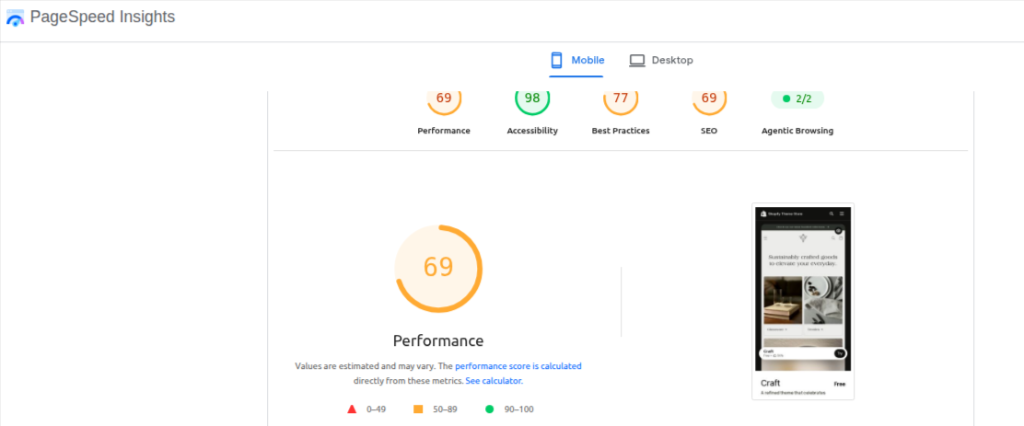
Then run the demo through Google PageSpeed Insights. This is a simple Shopify theme speed comparison you can do yourself in a few minutes. Keep in mind that demo scores will drop once you add your own images and apps, so treat them as a starting point. While you are on the demo, also check Shopify theme SEO basics like clear headings on product pages and image alt text support.
A Shopify theme built for a large electronics catalog will feel wrong for a single product skincare brand, and the other way around. Most Shopify themes on the Shopify Theme Store show which industries and catalog sizes they are made for.
Use that as a filter. The best shopify theme for your shopify store is the one that fits how your customers shop, not the one with the longest feature list.
Yes, and many brands do. There is a third path that people forget about: keep a free Shopify theme and add only what you need through custom work.
Dawn and Horizon are clean and well built, which makes them easy for a developer to extend. You can add custom sections, a better product page, a mega menu or an upsell block directly into the Shopify theme. Done well, this keeps your Shopify store fast because you only add the code you actually use, instead of a full paid Shopify theme with features you never switch on.
The trade off is that custom work needs a skilled developer, and updates take more care. But for many growing brands, a free Shopify theme plus a few custom sections ends up being the best balance of cost, speed and control.
At some point, some brands outgrow both free and paid Shopify themes. This usually happens when you have a very specific design, complex product options, multiple markets and languages, or a custom buying flow. In that case, a Shopify theme built for your brand from the ground up gives you full control over design, speed and SEO.
This is the kind of project our team handles through custom Shopify theme development. When your Shopify store reaches this stage, a custom Shopify theme gives you a site that grows with your brand instead of holding it back.
After years of setting up and fixing Shopify stores, my view on free vs paid Shopify themes is fairly simple. Free Shopify themes are a strong, fast base for brands that are starting out or keeping things lean. Paid Shopify themes pay for themselves when they replace apps, save developer hours and give a growing brand the look it needs.
What I would not do is decide on price alone. Write down the features you need, count the apps you pay for, run your own Shopify theme comparison using the demos, and then pick. The best Shopify theme is the one your team can run easily and your customers can shop on without any trouble.
If you are stuck between two Shopify themes, or you are not sure whether your current Shopify theme is holding your Shopify store back, my team at ControlF5 can take a look and give you an honest answer. As one of the best Shopify agencies, we help merchants pick the Shopify theme that actually fits their Shopify store.
Question: Are free Shopify themes good enough for a growing Shopify store?
Answer: Yes, for many brands they are. Free themes from Shopify are fast, mobile friendly and updated regularly. They start to fall short when you need advanced menus, many design sections or features that would otherwise need several paid apps. That is usually the right time to start looking at paid options.
Question: Do paid Shopify themes improve conversion rates?
Answer: Not by themselves. A paid theme gives you more Shopify theme features like quick view, swatches and sticky add to cart, which can make shopping easier. But conversions depend just as much on your product photos, pricing, page speed and trust signals. A well set up free Shopify theme can perform better than a badly set up paid one.
Question: Is a paid Shopify theme a one time payment?
Answer: Yes. Paid themes on the Shopify Theme Store are a one time purchase with free updates. The license covers one Shopify store only, and theme purchases are not refundable.
Question: Can I switch from a free theme to a paid theme without losing data?
Answer: Yes. Your products, collections, customers and orders stay in your Shopify admin, not in the Shopify theme. What you will need to redo is the design work, such as sections, homepage layout and any custom code. Always set up the new Shopify theme as a draft, test it fully, and then publish.
Question: Which free Shopify theme is best for a new brand?
Answer: Dawn and Horizon are the two I suggest most often. Dawn is simple, fast and widely supported by developers, while Horizon is newer and gives you more layout flexibility. When choosing a Shopify theme between the two, do a quick Shopify theme speed comparison of both demos, and check how each one handles Shopify theme SEO basics like headings and image alt text.


Most Shopify subscription churn comes from small, fixable problems. Here are the 8 most common reasons subscribers cancel and how to fix each one.
Here’s how to customize your Shopify theme so every update keeps your design, your custom features and your app settings in place.
A Shopify store can look polished on a laptop and fall apart the moment someone opens it on a phone. Buttons slide under images, text