

It was a Monday morning in early autumn. I had just settled in with my first cup of chai when a message came in from the team at Obi Outfitters, a Shopify brand that makes adorable apparel for babies and puppies.
The message was short, but I could feel the worry in it:
“Anurag, why is my Shopify store slow?
Parents are adding matching outfits to their carts and then leaving. The holiday gifting season is just weeks away. What’s going on?”
I opened their store on my phone. The homepage banner took a few long seconds to appear. The collection page stuttered as I scrolled. A pop-up jumped in before I could even see a single product.
Nothing was “broken.” But everything was heavy.
I’ve seen this story play out hundreds of times. Shopify’s servers are fast, and so is its global CDN. What makes a Shopify store slow is usually what gets added on top of it over time: apps, scripts, tracking pixels, fonts, videos, and small theme edits that pile up quietly over months.
After 14+ years in Shopify and 4,000+ projects with my team at ControlF5, I’ve learned one thing: a slow Shopify store is rarely one big problem. It’s usually five or six small ones hiding where no one looks.
In this blog, I’ll share the 11 hidden causes we find most often. For each one, I’ll explain why it happens, how to spot it, how to reduce Shopify load time, and what I personally suggest. Along the way, I’ll show you what we found inside the Obi Outfitters store.
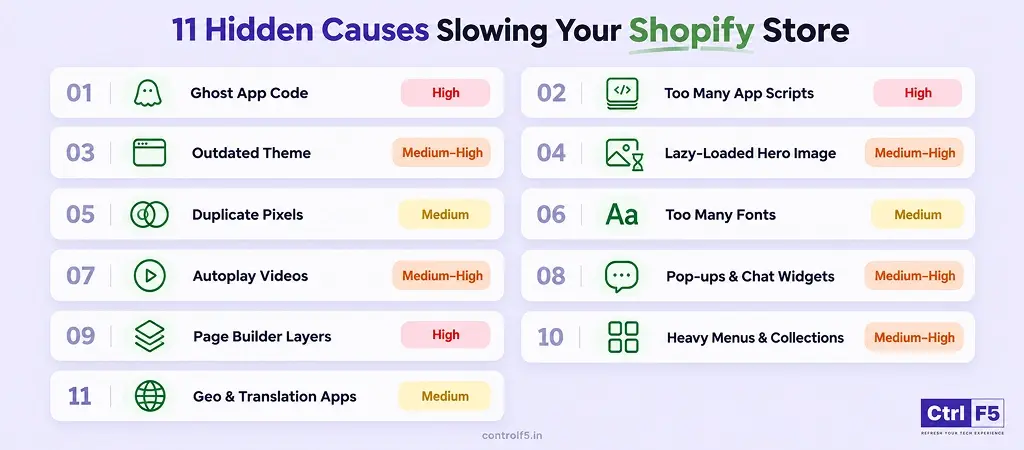
| Hidden Cause | Where It Hides | Speed Impact |
| Ghost code from uninstalled apps | theme.liquid, snippets | High |
| Too many app scripts | Every page | High |
| Outdated or over-customized theme | Theme code | High |
| Lazy-loaded hero image | Homepage, product pages | Medium–High |
| Duplicate tracking pixels | Theme, GTM, apps | Medium |
| Too many font weights | Theme CSS | Medium |
| Autoplay videos and YouTube embeds | Banners | High |
| Pop-ups, chat, and review widgets | Site-wide | Medium |
| Page builder layers | Landing pages | Medium–High |
| Heavy mega menus and collection pages | Header, collections | Medium |
| Geo, currency, and translation apps | Redirects, JavaScript | Medium |
When a Shopify store comes to us with Shopify speed issues, we never start by guessing. Every audit follows the same path, and each of our teams owns one part of it.
| Merchant says “my site feels slow”
↓ SEO team pulls real-user data (Core Web Vitals) ↓ Test 4 key pages on mobile: Home → Collection → Product → Cart ↓ Dev team audits theme code and app scripts ↓ Design team reviews images, videos, and fonts ↓ Fix list ranked by impact → Implement → Re-test |
We always test on mobile first. For a brand like Obi Outfitters, most shoppers are busy parents scrolling on their phones, often with a baby in one arm. Mobile is where slow pages hurt the most.
Before fixing anything, measure it. Sometimes a Shopify store only feels slow on the owner’s office Wi-Fi.
Google judges your Shopify page load time using three numbers called Core Web Vitals.
| Metric | What It Means in Simple Words | Good | Needs Work | Poor |
| LCP (Largest Contentful Paint) | How fast the main image or text appears | ≤ 2.5s | 2.5–4s | > 4s |
| INP (Interaction to Next Paint) | How fast the page reacts when someone taps | ≤ 200ms | 200–500ms | > 500ms |
| CLS (Cumulative Layout Shift) | How much the page jumps while loading | ≤ 0.1 | 0.1–0.25 | > 0.25 |
In your Shopify admin, open the Web performance report under Analytics. It uses data from real visitors, so it shows which metric is failing and when the problem started.
PageSpeed Insights shows field data (real users over 28 days) and lab data (one simulated test). Trust field data more. Lab scores change from run to run, so one bad result isn’t a reason to panic.
Many Shopify merchants search “core web vitals Shopify” and then chase a perfect 100. Please don’t. A Shopify store with a normal set of apps rarely hits 100. The real core web vitals Shopify goal is green results on your product and collection pages, because that’s where the money is made.
Why it happens: Many older Shopify apps write code directly into your theme files. When you uninstall the Shopify app, Shopify removes the app but not the code it added. That code keeps loading on every page and calling files that may not exist anymore.
How to spot it: Open theme.liquid and your Snippets folder. Look for app names you don’t recognise or no longer use. In PageSpeed Insights, failed requests to old app domains are another clear sign.
How to fix it: Duplicate your shopify theme first, then remove the leftover code one piece at a time and test after each removal. When choosing new Shopify apps, prefer ones that use App Embeds, because they switch off cleanly when removed.
My insight: We find at least one “ghost” in almost every audit we run. In the Obi Outfitters theme, our Shopify developers found code from apps the team had stopped using long ago. My suggestion: duplicate your theme before installing any new Shopify app. That backup becomes your clean fallback if something goes wrong.
Why it happens: Every app adds its own JavaScript. Many load it site-wide, even when the feature appears on one page only. A size-chart app, for example, has no reason to load on your blog or contact page.
How to spot it: In PageSpeed Insights, open “Reduce unused JavaScript” and look for third-party domains. Then list every installed Shopify app and ask yourself honestly which ones you’ve used this month.
How to fix it: Remove apps you don’t need. For the ones you keep, ask a Shopify developer to load their scripts only on the pages where they’re actually used.
My insight: My rule is simple. If a Shopify app hasn’t made you money or saved you time in the last 90 days, it goes. Shopify merchants are always surprised by this, but the fastest Shopify site speed fix I know is often just the “Uninstall” button.
Why it happens: Older “vintage” themes rely on heavy libraries like jQuery and weren’t built for Online Store 2.0. Years of custom edits by different freelancers add even more weight, and often those edits conflict with each other.
How to spot it: Your theme isn’t OS 2.0, it hasn’t been updated in years, or nobody on your team knows who made the last round of changes.
How to fix it: Update to the latest version of your theme. If it’s too outdated, move to a modern OS 2.0 theme and rebuild your custom features cleanly.
My insight: Shopify merchants fear theme changes because they love their current look, and I understand that. That’s why our Shopify design team rebuilds the same look on a modern theme. Customers notice only one difference: the store is faster.
Why it happens: Lazy loading tells the browser to wait before loading an image. That’s smart for images further down the page, but on your main banner it’s a mistake. The browser holds back the most important image, and your LCP score suffers.
How to spot it: In PageSpeed Insights, check the LCP element. If it’s your hero image and it’s flagged as “lazily loaded,” you’ve found the problem.
How to fix it: Set the first image to loading=”eager” and add fetchpriority=”high“. Serve it in WebP format at the right size, not a 4000px photo straight from the camera.
My insight: This is my favourite fix because it’s so small. One line of code can cut LCP by a second or more. If you want to reduce Shopify load time this week with just one change, start here.
Why it happens: The same pixel often gets added three different ways: once by a sales channel app, again through Google Tag Manager, and again hardcoded by a previous agency. Each copy loads and fires separately.
How to spot it: Install the Meta Pixel Helper or Google Tag Assistant browser extensions and visit your Shopify store. If the same event fires twice or more, you have duplicates.
How to fix it: Keep one source for each pixel. Move tracking to Shopify’s Customer Events where possible, since it runs pixels in a controlled sandbox.
My insight: Duplicate pixels cause two problems, not one. They slow your Shopify store down, and they inflate your reported conversions, so you make ad decisions on wrong numbers. Clean tracking gives you a faster store and honest data.
Why it happens: Every font weight and style (light, regular, bold, italic) is a separate file. Four weights across two font families means eight files before your text can look right.
How to spot it: In Chrome DevTools, open the Network tab and filter by “Font.” Count how many files load.
How to fix it: Use two weights at most. Add font-display: swap so text shows immediately while the font loads. System fonts are another fast option.
My insight: I tell our Shopify design team: one font family, two weights. Strong branding comes from consistency, not from six versions of the same font.
Why it happens: Background videos look beautiful, but a large video file or a YouTube iframe downloads a lot of data before the rest of the page loads. On mobile data, that wait feels endless.
How to spot it: You have a video in your homepage banner, and PageSpeed shows a very large total page weight.
How to fix it: Show a poster image that loads the video only when someone taps play. For short clips, compress them heavily or replace them with one strong image. A single hero video can easily double your Shopify page load time.
My insight: I love video for storytelling. A puppy wearing a tiny hoodie is pure joy on screen. But not at the top of a mobile page. Show a great image first and let people choose to press play.
Why it happens: These widgets load the moment the page opens, even though nobody uses them in the first few seconds. They compete with your product images and slow down taps, which hurts INP.
How to spot it: Check which third-party scripts appear early in your PageSpeed report, and notice whether widgets appear instantly on load.
How to fix it: Delay pop-ups until the visitor scrolls or stays a few seconds. Load chat only when someone clicks the chat icon. Load reviews when the visitor scrolls near them.
My insight: No shopper wants a discount pop-up in the first two seconds anyway. Delaying it helps your speed and usually your sign-up rate too.
Why it happens: Page builders add their own CSS and JavaScript framework on top of your theme. Your Shopify store ends up loading two design systems at once.
How to spot it: Compare a builder page with a regular theme page in PageSpeed Insights. If the builder page scores much lower, you’ve found the gap.
How to fix it: Rebuild your important pages using Online Store 2.0 sections and blocks, which load only what the page needs.
My insight: Builders are great for testing a campaign page quickly. But once a page becomes permanent and starts bringing in money, it deserves clean, native code.
Why it happens: A mega menu with hundreds of links loads all of them on every page, even hidden ones. Collection pages showing 48+ products, each with colour swatches and quick-view, make the browser work even harder.
How to spot it: PageSpeed shows an “excessive DOM size” warning, or your collection pages are much slower than your product pages.
How to fix it: Trim your menu to what shoppers actually use. Show 16–24 products per page, and use lighter swatches.
My insight: Your menu should guide shoppers, not overwhelm them. For a brand like Obi Outfitters, simple paths like “Baby,” “Puppy,” and “Matching Sets” beat a menu with 200 links.
Why it happens: Some Shopify apps redirect visitors based on location, which adds an extra step before the page even starts loading. Others translate text with JavaScript after the page loads, which makes content jump and flicker.
How to spot it: Look for redirect chains in PageSpeed, or watch for text changing language a moment after the page appears.
How to fix it: Use Shopify Markets for currencies and regions, and Translate & Adapt for languages. Both work natively inside Shopify.
My insight: Before adding any “international” app, check what Shopify already offers for free. Native features are almost always lighter than add-ons.
Remember that Monday morning message? Here’s what happened next.
When we opened the Obi Outfitters store, the story was familiar. Years of good intentions had added apps, a homepage video, multiple fonts, and tracking from several sources. The team thought they might need a full redesign before the holidays.
They didn’t. Our dev team removed unused apps and their ghost code. Our design team swapped the hero video for a compressed image and cut the fonts to two weights.
Our SEO team moved the pixels to Customer Events. We also delayed pop-ups and chat.
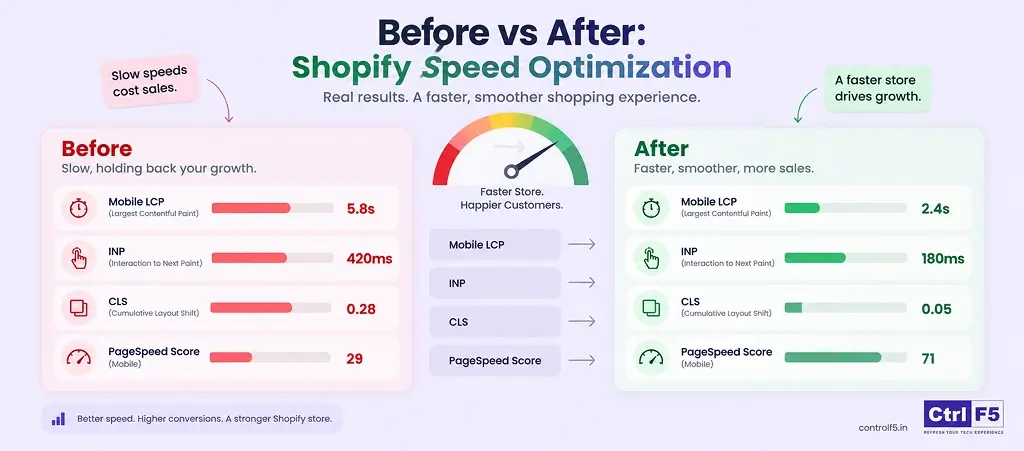
| Metric | Before | After |
| Mobile LCP | 5.8s | 2.4s |
| INP | 420ms | 180ms |
| CLS | 0.28 | 0.05 |
| Mobile PageSpeed score | 29 | 71 |
| Installed apps | 38 | 24 |
There was no magic Shopify site speed fix. We cleaned up and cut their Shopify page load time by more than half, just in time for gifting season.
For the full story of how ControlF5 built the Obi Outfitters Shopify store from the ground up, see how we built Obi Outfitters into a growing USA brand.
Work from the top down. The quick wins come first.
| Is your hero image lazy-loaded?
├─ Yes → Fix it first (quick win) └─ No ↓ Any apps unused for 90 days? ├─ Yes → Uninstall + remove leftover code └─ No ↓ Pixels firing more than once? ├─ Yes → Consolidate tracking └─ No ↓ Video, pop-ups, or chat loading upfront? ├─ Yes → Delay or replace └─ No ↓ Theme outdated or builder-heavy? └─ Yes → Plan a theme update or rebuild |
I always tell Shopify merchants: you don’t need an expert for everything. But you do need to know where your limit is.
Some Shopify speed issues are safe to handle on your own, with no coding needed:
If you do these five things, you’ll often see a noticeable improvement within a day.
Here’s where I’d honestly recommend bringing in help:
I’ve seen Shopify merchants copy a code snippet from a forum, paste it into their theme, and break the add-to-cart button without noticing for days. A slow Shopify store loses some sales. A broken store loses all of them.
An experienced Shopify developer knows which scripts are safe to defer, which Shopify apps depend on each other, and how to test changes on a duplicate theme before anything goes live.
A slow or broken checkout can also lead to lost sales, so it’s worth reviewing your checkout process and conversion opportunities before making technical changes.
Whether you work with us or someone else, a good expert should:
Speed is only one part of creating a successful shopify store. For a broader look at the key elements that contribute to a high-converting e-commerce store, see our 10-step guide.
At ControlF5, speed work is never a one-person job. Our SEO team reads the real-user data and finds the pages losing the most traffic. Our Shopify experts and developers clean the theme code, remove ghost scripts, and load apps only where they’re needed. Our design team makes sure the store stays beautiful while getting lighter.
That’s exactly how we worked with Obi Outfitters. No redesign, no downtime, and a faster store before the busiest season of their year.
If your store is slowing down and you don’t have the time to dig into the code yourself, it may be the right moment to hire a Shopify expert who can find what’s holding it back and fix it without breaking what already works.
The Obi Outfitters store was never broken. It was simply carrying too much weight. Once that weight was gone, the Shopify store felt new again, right when shoppers needed it most.
So the next time you ask yourself, “why is my Shopify store slow?”, don’t blame Shopify first. Look at what has been added over time. The fixes are usually simpler than you think, and when they’re not, the right expert can save you weeks of guesswork.
If you’d like my team to find what’s slowing your Shopify store, talk to us at ControlF5. We’ll show you exactly where the weight is hiding.
Question: Does the number of Shopify apps affect store speed?
Answer: Yes, but what each app loads matters more than the count. Ten lightweight Shopify apps can run faster than three heavy ones. Check what every app adds to your pages, not just how many you have.
Question: Why is my Shopify store slow only on mobile?
Answer: Phones have slower processors and often weaker networks, so heavy JavaScript hurts more. A Shopify store slow on mobile but fine on desktop usually has too many scripts, large images, or a hero video.
Question: Do Shopify speed optimization apps actually work?
Answer: Some help with image compression, which is useful. Many others only hide problems or add scripts of their own. Most Shopify speed issues need real cleanup, not one more app.
Question: How much does store speed affect conversion rate?
Answer: More than most Shopify merchants expect. Deloitte’s “Milliseconds Make Millions” study found that a 0.1-second improvement in mobile site speed increased retail conversions by 8.4%. Small gains add up.
Question: Will changing my theme make my Shopify store faster?
Answer: Only if the new theme is lean and you don’t bring the same app clutter with you. A fast theme with 40 apps on top becomes slow again very quickly.
Question: How often should I run a speed audit?
Answer: Every quarter, and after installing any new app or before a big season. For seasonal brands, test at least a month before peak traffic.






In this blog, I am sharing the BFCM strategies 2026 and offer tips that I have seen work again and again.
Finding the best Shopify agency in the USA can feel overwhelming. There are hundreds of Shopify agencies claiming to be “the best,” but only a handful actually have the experience, technical depth, and client results to back it up.
This guide will show you exactly what agentic ecommerce is, how AI platforms like ChatGPT, Google AI Mode, and Perplexity decide which products to recommend — and what you need to do so your Shopify store shows up in those conversations.