


A Shopify founder got on a call with our team at ControlF5 a while back. She had spent eight months building her handcrafted ethnic wear label. Stunning lookbook photos. A premium theme. Glowing reviews from customers who loved her kurtas and co-ord sets.
And almost no organic traffic.
She said, sounding tired, “I Googled my own product name. My store wasn’t on the first page. A reseller on Amazon was.”
Here’s what I told her, and what I’ll tell you: a Shopify store not ranking on Google is not a mystery.
It’s a diagnosis. After 14+ years of building and fixing Shopify stores, I’ve learned that ranking problems rarely come from one big disaster. They come from small things quietly stacking up.
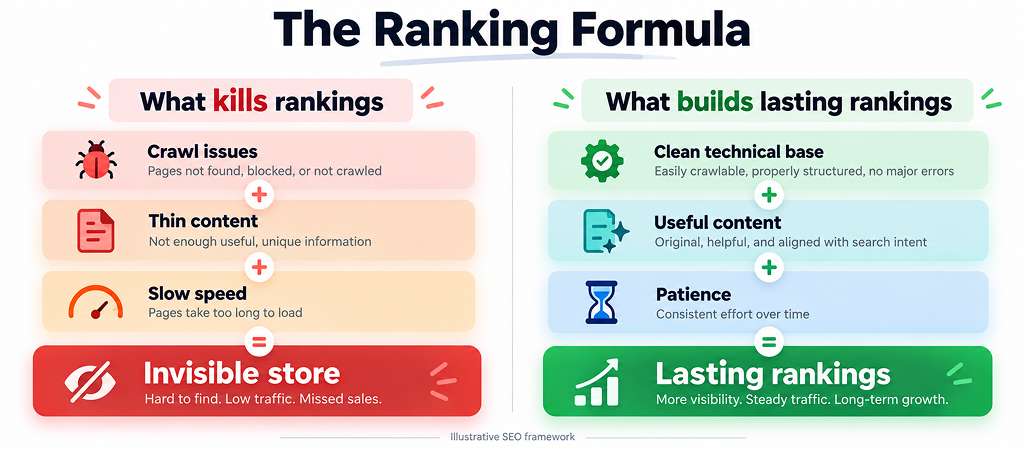
A small crawl issue + thin product pages + a slow theme = a Shopify store Google politely ignores.
What follows is the same Shopify SEO checklist our team runs when a struggling Shopify store lands on our desk.
Think of it as a health check-up for your Shopify store. We’ll start with the pulse and work our way to the finer details.
Before you touch keywords or blog posts, answer the most basic question: does Google even know your Shopify store exists?
In most cases, the honest answer to “why is my Shopify store not showing on Google” starts right here.
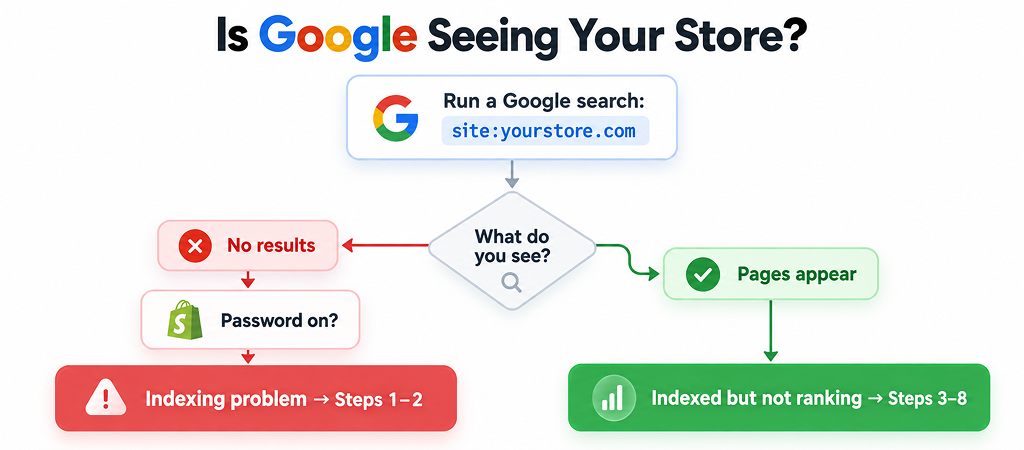
Open Google and type site:yourstore.com. Then follow this:
| Search: site:yourstore.com | v Do any results show up? / \ NO YES | | v v Is your storefront Are your main product & password still ON? collection pages listed? | / \ v NO YES Remove it + submit | | sitemap in Search v v Console (Step 1) Indexing problem Indexed but not ranking → Steps 1 & 2 → Steps 3 to 8 |
The usual reasons a Shopify store is not indexed by Google:
From my experience: I’ve lost count of how many “SEO emergencies” ended with one click: turning off the launch password. Check this first. It takes ten seconds and might save you ten weeks.
Doing SEO without Search Console is driving at night with the headlights off. A proper Shopify Google Search Console setup takes about fifteen minutes:
That report is where the real story lives. Here’s how to read it:
| Status in Search Console | What it usually means on Shopify | What to do |
| Crawled – currently not indexed | Google visited but didn’t think the page was worth keeping (often thin or duplicate content) | Improve the content or merge weak pages |
| Discovered – currently not indexed | Google knows the URL but hasn’t crawled it, often because crawl effort is wasted on filter and tag URLs | Cut junk URLs, strengthen internal links |
| Duplicate without user-selected canonical | Several URLs showing the same product | Check canonicals and link to clean URLs |
| Excluded by ‘noindex’ tag | A page is deliberately (or accidentally) hidden | Check theme code and SEO apps |
| Blocked by robots.txt | Shopify blocks cart, checkout, and search pages by default, which is normal | Only worry if product or collection pages appear here |
Shopify has a few habits that create Shopify SEO issues if nobody is watching.
The duplicate URL trap. Every product lives at /products/blue-hoodie. But many themes link to it through collections too, like /collections/winter/products/blue-hoodie.
Shopify adds a canonical tag pointing to the clean URL, which helps, but Google still has to crawl and sort through all those versions.
| 1 product × 5 collections = 6 URLs Google has to figure out. Multiply that by 500 products, and you see the problem. |
These Shopify duplicate content issues get worse with tag pages (/collections/all/tag-name) and filter parameters (?filter.v.color=blue). The fix is often a small theme edit: make product cards link straight to /products/ URLs instead of collection-aware ones.
Theme-level problems to check:
Here’s something I say to every Shopify merchant: every Shopify app you install is a guest who brings luggage. Some of them never leave, even after you uninstall them. Their leftover code keeps loading on every page.
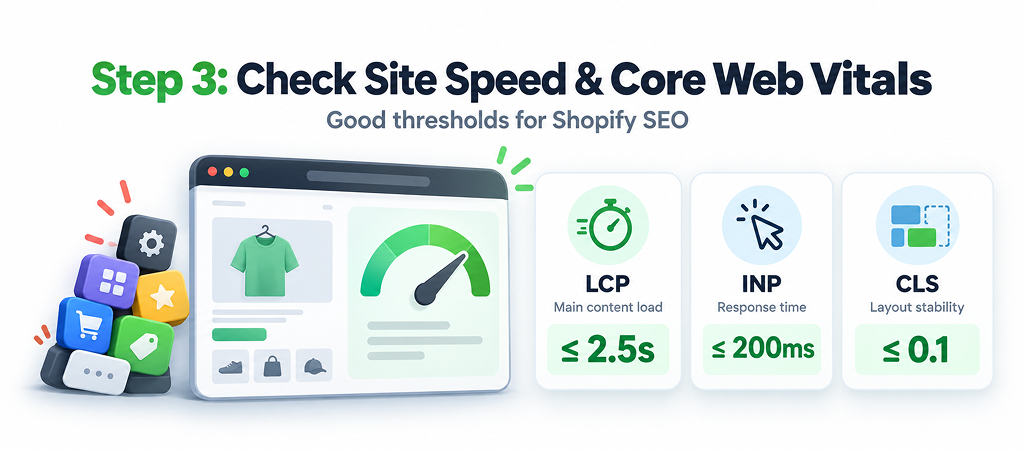
Shopify site speed and SEO are tightly linked because Google uses Core Web Vitals as a ranking signal. Aim for these “good” thresholds:
My suggestion: Before buying a “speed booster” app, do an app audit. List every app, ask “did this make us money in the last 90 days?”, and remove the ones that didn’t. Then check your theme files for leftover scripts.
At ControlF5, this one exercise often does more for speed than any optimization plugin.
 Step 4: Audit Your On-Page SEO
A new Shopify store trying to rank for “shoes” is like a corner bakery competing with a national chain on “bread.” Go specific: “vegan leather ankle boots for wide feet” is winnable.
Also watch for keyword cannibalization, where a product, a collection, and a blog post all chase the same keyword. They end up competing with each other, and Google can’t decide which one to show.
Right keyword + matching page type = a page Google understands.
Buying keywords → product/collection pages. Learning keywords → blog posts.
Shopify stores without any blog content struggle to rank for questions people ask before they buy. Google’s helpful content guidance rewards sites that show real expertise on a topic, not just a catalog.
Build topic clusters around your categories. Selling planters? Write about watering schedules, indoor light, and choosing pot sizes, then link each post back to the relevant collection.
Next, show who’s behind the content. Add an author bio to every blog post and create a dedicated author page that covers the writer’s experience, credentials, and other published work. Google wants to see that real people with real knowledge are giving the advice, and a blog with no named author makes that hard to prove.
This is also one of the first things we fix at AuthorityLifts, where we build SEO and AEO content for Shopify stores that need to earn trust with both Google and AI search tools.
That’s how you learn how to improve Shopify SEO in a way that compounds over time.
Backlinks are how the web vouches for a new Shopify store. Earn them safely through supplier pages, local press, niche reviewers, and brand collaborations. Avoid anything promising “500 backlinks for $50.”
If your traffic was fine and then suddenly fell off a cliff, walk through this:
| Organic traffic dropped suddenly | v Manual action listed in Search Console? YES → Fix the issue → Request a review NO | v Recent migration, theme change, or URL change? YES → Check 301 redirects (Online Store → Navigation → URL Redirects) NO | v |
Does the drop line up with a Google core update?
YES → Review content quality (Step 6)
NO → Check tracking, seasonality, and Steps 1 to 3
From our experience: Missing redirects after a migration are the silent killer. We’ve seen Shopify stores move from WooCommerce or Magento and lose years of ranking history simply because old URLs started returning 404s.
Map every old URL to a new one before you switch.
Bookmark this and revisit it every quarter.
| Check | Where to Look | What “Good” Looks Like | Priority |
| Store is indexed | site: search, GSC Pages report | Key pages appear in results | 🔴 High |
| Password removed | Online Store → Preferences | Storefront publicly accessible | 🔴 High |
| Sitemap submitted | GSC → Sitemaps | Status: Success | 🔴 High |
| No accidental noindex | Page source, SEO apps | Only intended pages hidden | 🔴 High |
| Clean product links | Theme product-card code | Links go to /products/ URLs | 🟠 Medium |
| Core Web Vitals | PageSpeed Insights, GSC | LCP ≤ 2.5s, INP ≤ 200ms, CLS ≤ 0.1 | 🟠 Medium |
| Unique product content | Product pages | No copied manufacturer text | 🟠 Medium |
| Collection intro text | Collection pages | Helpful, keyword-aware copy | 🟠 Medium |
| Redirects after changes | URL Redirects | No important URLs returning 404 | 🔴 High |
| Quality backlinks | Any backlink tool | Relevant, natural links growing | 🟢 Ongoing |
Technical fixes like removing a password or submitting a sitemap can show results in days to a few weeks. On-page and content improvements usually take two to four months to show real movement. Building authority in a competitive niche is a six-to-twelve-month game.
Anyone promising page one in 30 days is selling a dream, not a strategy.
Here’s how I’d split it:
| You Can Handle It Yourself | Worth Bringing in an Expert |
| Removing the storefront password | Fixing collection-aware URLs in theme code |
| Submitting your sitemap | Diagnosing complex indexing reports |
| Rewriting product titles and descriptions | Core Web Vitals and app-code cleanup |
| Adding alt text to images | Planning and executing store migrations |
| Writing collection intro copy | Structured data and schema fixes |
My personal take: If you’re spending more hours reading SEO forums than running your business, that’s your signal. Your time is worth more on product and customers.
When our team audited her Shopify store, there was no single villain. It was the stack: collection-aware links creating hundreds of duplicate URLs, product descriptions reused from her fabric supplier’s catalog, and 23 installed apps, several long abandoned but still loading scripts.
We fixed the links, cut the Shopify apps down to what earned their place, and rewrote her top product and collection pages in her own voice. Within about four months, her organic traffic had roughly tripled, and her brand name finally showed her store at the top.
Clean technical base + genuinely useful content + patience = rankings that last.
If you’ve gone through this checklist and still can’t find the leak, that’s exactly what we do. Get a Shopify SEO audit from ControlF5 →
Answer: Usually, the storefront is still password-protected, the domain is too new to be crawled, or a noindex tag is hiding your pages. Run a site:yourstore.com search and check the Pages report in Search Console to see which one it is.
Answer: Shopify covers the basics well, with automatic sitemaps, canonical tags, and editable meta fields. But your theme, apps, and content quality decide whether you actually rank.
Answer: Submit your sitemap, then use URL Inspection → Request Indexing for your homepage, top collections, and best sellers. Linking new pages from your main navigation also helps Google find them quickly.
Answer: Yes. Apps that load scripts slow down your pages and can hurt Core Web Vitals, and some leave code behind even after you uninstall them. A quarterly app audit keeps this in check.
Answer: Yes, for specific, low-competition keywords like “handmade walnut cutting board with juice groove.” For broader terms like “cutting boards,” you’ll need to build authority over time.


Is your Shopify store loading slowly? Explore 11 hidden causes that affect website speed and learn how to fix common performance issues.
In this blog, I am sharing the BFCM strategies 2026 and offer tips that I have seen work again and again.
Finding the best Shopify agency in the USA can feel overwhelming. There are hundreds of Shopify agencies claiming to be “the best,” but only a handful actually have the experience, technical depth, and client results to back it up.