

Key Highlights: Starting a wholesale Shopify business follows a clear process: choose a profitable niche → register your business → find reliable suppliers → set up your Shopify store → add wholesale pricing tiers and customer approval → configure payments and shipping → launch, market, and scale your B2B business. By following this structured approach, you can build a streamlined wholesale system that attracts bulk buyers, automates operations, and grows consistently in 2026.
Over the last few years, I’ve personally helped multiple brands shift from manual bulk orders to fully automated B2B systems.
At ControlF5, we work closely as Shopify experts with businesses that want to understand how to start a wholesale Shopify business the right way, not just launching a store, but building a scalable wholesale engine.
Retailers and distributors expect structured pricing, company logins, credit terms, and seamless reordering. That’s why this is the perfect time to start Shopify wholesale store operations. Shopify has evolved significantly, making it easier than ever to create a B2B wholesale Shopify store infrastructure with proper automation and advanced tools.
In this guide, I’ll walk you through everything step by step, based on real implementation experience, so you can confidently build and grow your wholesale Shopify e-Commerce business.
Wholesale ecommerce means selling products in bulk to retailers, resellers, or institutions at discounted rates. Instead of focusing on single transactions like retail, wholesale is built around larger order volumes and long-term B2B relationships.
Wholesale vs retail: key differences
| Feature | Wholesale | Retail |
| Order size | Bulk quantities | Single units |
| Pricing | Tiered / volume discounts | Fixed pricing |
| Buyers | Businesses | Individual customers |
| Payment terms | Net-30 / Net-60 | Immediate payment |
To properly understand how to sell wholesale on Shopify, you must go beyond basic product listings. Wholesale requires structured pricing tiers, customer approval systems, and backend automation.
A strong B2B ecommerce Shopify setup ensures you can manage bulk buyers, payment terms, and repeat orders efficiently.
As a Shopify developer, this is the exact process I follow when building wholesale stores for clients. I’ve simplified it into 10 practical steps so you can go from idea to a live B2B store without confusion.
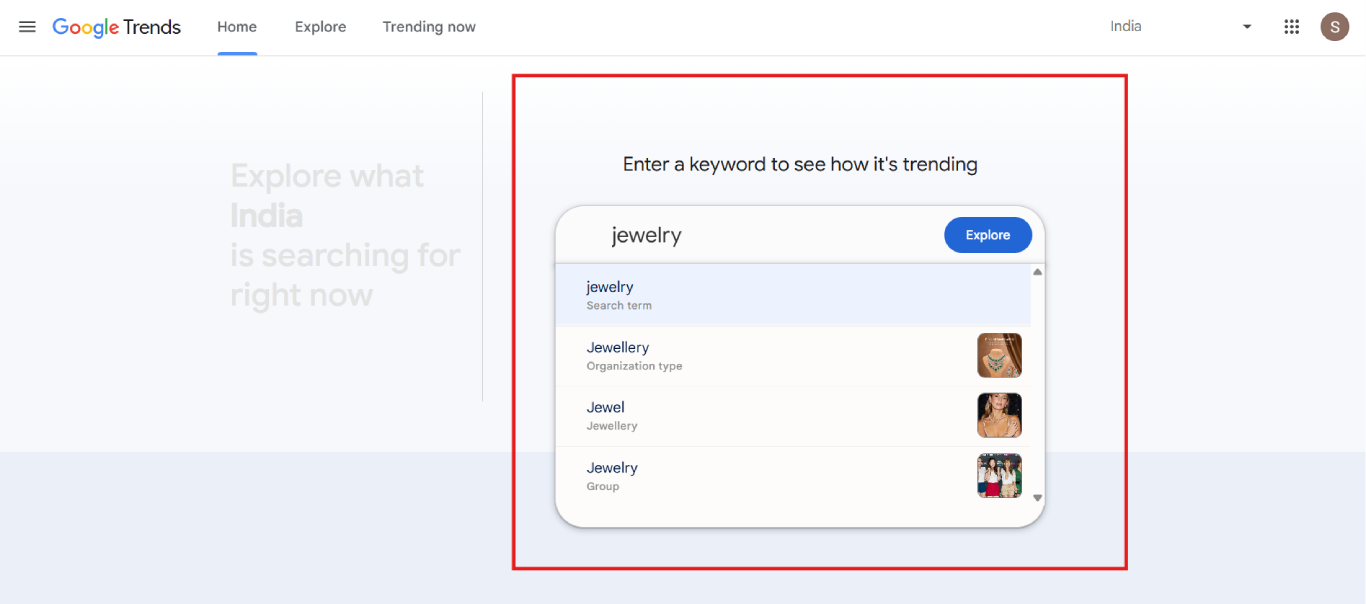
Start by selecting products that Shopify businesses will buy repeatedly, not just once. Wholesale success depends on consistent demand and reorder frequency, so focus on categories like apparel, jewelry, online gift store, and furniture and home decor.
Before finalizing, analyze competitors, pricing, and demand to ensure your niche is scalable.
Open Google Trends → Search your niche → Check demand trend
Open Amazon / competitor websites → Analyze pricing, reviews, competition
A registered Shopify wholesale business builds trust with wholesale buyers and is required for tax handling and bulk transactions. Without proper registration, many retailers may hesitate to work with you.
Make sure your Shopify business is legally compliant based on your country.
India:
Open MCA Portal → Register company
Open GST Portal → Apply for GST
USA:
Open State website → Register LLC
Open IRS website → Apply for EIN
UAE:
Open DED / Freezone portal → Register business → Get trade license
Now create your Shopify account and access your admin dashboard. This is where you’ll manage products, customers, and orders.
Use a professional Shopify store name and complete all business details correctly.
Steps:
Open Shopify.com → Click “Start free trial”
Enter email → Password → Store name
Then:
Open Shopify Admin → Settings → Store details → Add business info
If you’re still exploring options, you can also check out the best platforms to build an online store to compare different solutions before finalizing your setup.
Before adding products, set up essential settings like currency, taxes, and checkout options. This ensures your Shopify store runs smoothly and avoids issues later.
It also helps in accurate pricing and order processing.
Steps:
Open Shopify Admin → Settings → General → Set currency
Click Settings → Taxes → Configure tax region
Click Settings → Checkout → Enable customer accounts
Add your products with clear descriptions, high-quality images, and proper pricing. Wholesale buyers prefer quick and clear product information.
Then organize products into collections so buyers can easily navigate your Shopify store.
Steps:
Shopify Admin → Products → Add product → Enter details → Save
Shopify Admin → Products → Collections → Create collection → Add products
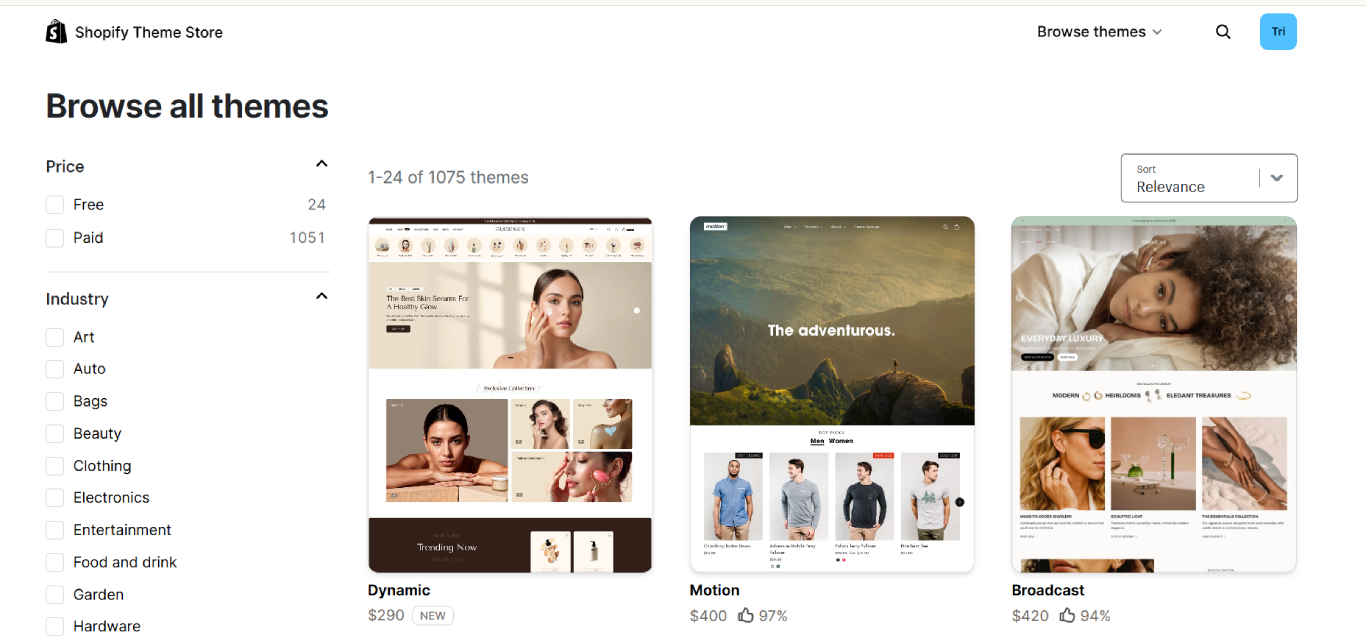
Your Shopify horizon themes defines how your Shopify store looks. For wholesale, choose a clean and structured theme that highlights bulk pricing and product details.
A simple and fast design improves user experience and conversions.
Steps:
Shopify Admin → Online Store → Themes
Click Visit Theme Store → Install theme (Dawn / Trade / Warehouse)
Click Customize → Adjust layout and sections
Wholesale Shopify stores require quantity-based pricing instead of fixed prices. This encourages buyers to purchase more units and increases your average order value.
Use the best Shopify apps to automate pricing rules instead of managing them manually.
Steps:
Shopify Admin → Apps → Shopify App Store
Search → Install Wholesale Gorilla / Bold Custom Pricing
Then:
Open app → Create pricing rules → Set quantity discounts (10+, 50+, 100+)
Assign pricing to wholesale customers
You should not allow direct access to wholesale pricing. Instead, create a system where Shopify businesses apply and get approved.
This helps you filter serious buyers and protect your pricing.
Steps:
Shopify Admin → Online Store → Pages → Add page
Create “Wholesale Registration” page → Add form
Then:
Shopify Admin → Customers → Review applications
Approve users → Add tag “Wholesale”
Wholesale orders usually involve larger quantities, so payment and shipping need to be configured carefully.
Offer flexible payment options and set bulk-friendly shipping rules to avoid losses.
Steps:
Shopify Admin → Settings → Payments → Enable payment methods
Shopify Admin → Settings → Shipping and delivery → Create shipping zones → Add rates
Once everything is set, launch your Shopify store and start attracting B2B buyers. Marketing is essential to generate leads and build long-term relationships.
Focus on SEO, outreach, and email marketing to grow consistently.
Steps:
Shopify Admin → Settings → Domains → Add domain → Set primary
Online Store → Preferences → Remove password → Go live
Then:
Shopify Admin → Marketing → Create campaigns → Start promotions
If you’re still in the early stages and want a complete foundation guide, don’t miss our detailed article on How to Build a Shopify Store For Levelling Up Your E-commerce Business.
Over the years, I’ve seen many wholesale stores struggle, not because Shopify doesn’t work, but because the foundation wasn’t structured properly. When setting up a wholesale business, avoiding these common mistakes can save you time, money, and lost opportunities.
1. No structured pricing: Random discounts without clear Shopify wholesale pricing tiers reduce margins and confuse buyers. Wholesale pricing must be volume-based and strategically calculated.
2. Skipping customer approval: Without a proper approval system, retail customers may access wholesale rates. A strong Shopify wholesale customer approval workflow protects your pricing and keeps your B2B model organized.
3. Weak supplier contracts: Unclear agreements on MOQ, lead times, or quality standards can break long-term wholesale relationships. Supplier reliability is critical for repeat bulk orders.
4. Ignoring automation: Manual invoicing and inventory tracking slow down operations. A solid B2B ecommerce Shopify setup should include automation for orders, stock sync, and payment terms.
5. Using the wrong apps: Choosing unreliable or incompatible tools can create technical issues. The best Shopify apps ensure smooth performance and scalability.
A properly planned Shopify wholesale store setup eliminates these risks and builds a strong foundation for long-term wholesale growth.
When I discuss budgets with clients planning a Shopify wholesale store setup, I explain that starting online wholesale is far more affordable than traditional distribution models.
Here’s a realistic estimate:
| Expense | Estimated cost |
| Shopify plan | $39–$399/month |
| Wholesale apps | $20–$100/month |
| Domain & branding | $50–$300 |
| Initial inventory | $1,000–$10,000 |
| Marketing budget | $500–$2,000 |
To simplify plan selection based on budget and growth stage:
Your total cost depends on whether you choose a basic setup or a more advanced b2b ecommerce Shopify setup. Inventory usually takes the largest share, while apps are essential for managing Shopify wholesale pricing tiers and approvals.
If you’re unsure about pricing tiers, you can explore our Shopify basic pricing breakdown to understand what each plan offers.
Overall, costs vary based on niche and scale, but the online wholesale model remains highly scalable and cost-efficient.
At ControlF5, my team and I have built and scaled Shopify stores across beauty, jewelry, fashion, and multi-category brands. We focus on performance, conversions, and long-term scalability, not just design.
Redesigning Luxe by Mia – We transformed a beauty brand’s store into a high-converting Shopify experience with improved UX, faster speed, and optimized product pages.
WooCommerce to Shopify migration – We migrated a store from WooCommerce to Shopify, preserving SEO, improving speed, and stabilizing sales performance.
Aayraa Jewels store build – We created the Shopify store from scratch, handling branding, theme customization, collections, and seamless checkout integration.
From redesigns to migrations and full builds, we help brands grow with structured, conversion-focused Shopify solutions.
As Shopify experts, my team and I at ControlF5 don’t just build stores; we build structured, scalable wholesale systems. Whether you’re starting from scratch or upgrading an existing setup, we guide you through the complete process of launching a powerful B2B store.
Here’s how we help:
If you’re serious about building a professional wholesale business, you can hire Shopify experts who understand both technical setup and business strategy.
You can book a free consultation call with us to discuss your wholesale plan, or simply send your queries and concerns over email.
Let’s build your wholesale Shopify system the right way.
Question: How to set up wholesale on Shopify?
Answer: You can set up wholesale on Shopify by using Shopify Plus or installing wholesale apps to create pricing tiers, add a wholesale registration form, enable customer approval, and configure bulk discounts and payment terms.
Question: How to start e-commerce with Shopify?
Answer: Start by choosing a niche, registering your business, selecting a Shopify plan, adding products, and setting up payments and shipping. Then focus on SEO and marketing to drive traffic and sales.
Question: How much money is needed to start a Shopify store?
Answer: On average, you may need $500–$2,000 to launch a basic Shopify store, including plan, domain, apps, and marketing. Inventory investment will increase the overall budget, depending on your niche.



Finding the best Shopify agency in the USA can feel overwhelming. There are hundreds of Shopify agencies claiming to be “the best,” but only a handful actually have the experience, technical depth, and client results to back it up.
This guide will show you exactly what agentic ecommerce is, how AI platforms like ChatGPT, Google AI Mode, and Perplexity decide which products to recommend — and what you need to do so your Shopify store shows up in those conversations.

Jewellery shoppers judge a brand by its presentation first. A clean, premium Shopify store can instantly build trust, highlight craftsmanship, and improve conversions across mobile and desktop.