


A low average order value is one of the most common problems I see in Shopify stores. The Shopify store gets traffic, customers buy, but each order is small. You end up working harder for the same money, because your ad costs, packing, and shipping stay the same while the revenue from each order doesn’t grow.
I’m Anurag Pandey, founder of ControlF5. My team and I have spent years building and fixing Shopify stores for merchants of all sizes, and AOV is one of the first numbers I check when we audit a Shopify store.
The good news is that a low average order value is usually easy to fix. In most Shopify stores I’ve worked on, the problem wasn’t the products. It was that the Shopify store never gave customers a reason or an easy way to add more to their cart.
In this blog, I’ll explain what average order value is, why yours might be low, and 9 fixes we use with our own clients. If you want to increase average order value, Shopify already gives you most of the tools you need.
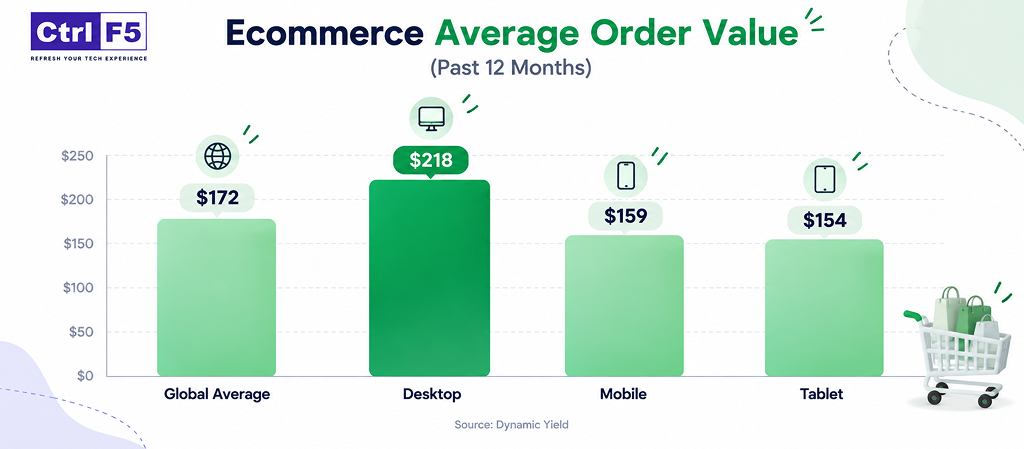
Before you judge your own AOV, it helps to see how other online stores are doing. Here’s what Dynamic Yield’s ecommerce benchmarks show for the past twelve months:
| Benchmark | AOV |
| Global ecommerce average | $172 |
| Desktop orders | $218 |
| Mobile orders | $159 |
| Tablet orders | $154 |
Average order value, or AOV, is the average amount a customer spends each time they place an order in your Shopify store.
When it comes to Shopify average order value, ecommerce stores that track it closely usually find easy ways to earn more from every sale.
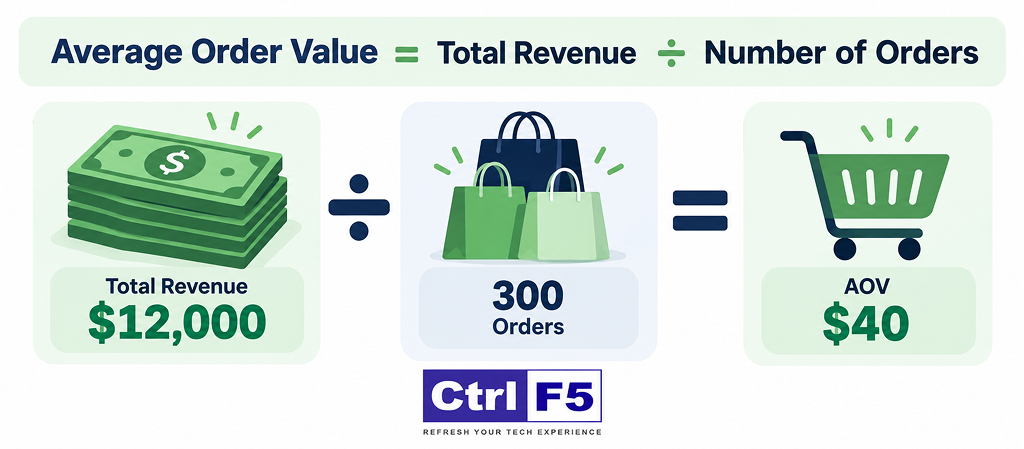
The formula is simple:
AOV = Total Revenue ÷ Total Number of Orders
Here’s an example:
| Month | Total Revenue | Number of Orders | AOV |
| January | $12,000 | 300 | $40 |
| February | $15,000 | 300 | $50 |
Look at the table closely. Both months had the same 300 orders. But in February, each customer spent $10 more, and the Shopify store made $3,000 extra without getting a single new customer.
That’s why AOV matters so much. Getting new customers costs money. Getting existing customers to spend a little more per order often costs very little.
A quick note: when you calculate AOV, use the same numbers every time. Some people include shipping and taxes, some don’t. Shopify’s own report uses its own method, so if you’re comparing months, stick to one source.
There’s no single “good” number, and I’d be careful with anyone who gives you one. AOV depends heavily on what you sell.
A Shopify store selling $15 phone cases and a Shopify store selling $900 sofas will never have similar AOVs, and that’s fine.
Here’s how I’d suggest judging your AOV instead:
| What to Check | Why It Matters |
| Your AOV vs. your cheapest product price | If your AOV is almost the same as one product’s price, most people are buying just one item. |
| Your AOV vs. your cost per order | If ads, shipping, and packing eat most of each order, your AOV is too low to be profitable. |
| Your AOV over the last 6 to 12 months | A flat or falling line means your Shopify store isn’t encouraging bigger carts. |
| Your AOV vs. your free shipping threshold | If the threshold is below your AOV, it’s not pushing anyone to add more. |
In simple words, a good AOV is one that keeps you profitable and keeps growing over time. Your own past numbers are the best benchmark you have.
Before jumping to fixes, it helps to know what’s causing the problem. These are the reasons I see most often when we audit Shopify stores.
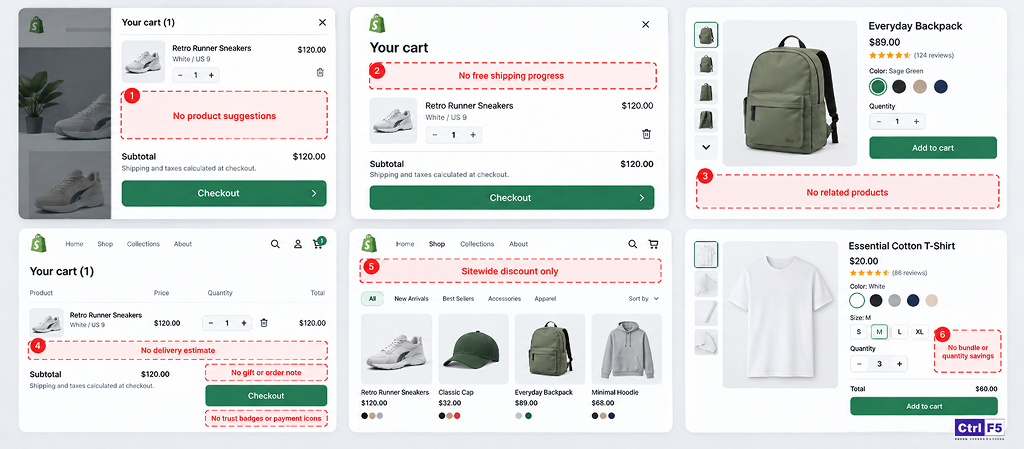
A customer adds one item and goes straight to checkout. Nobody showed them a matching product, an accessory, or a better option. In a physical shop, a salesperson would suggest something. Online, your Shopify store has to do that job.
If free shipping kicks in at $30 and your AOV is already $45, the offer isn’t pushing anyone to spend more. And if you don’t have a threshold at all, you’re missing one of the simplest ways to grow cart size.
Many Shopify stores send ad traffic to one product page with no links to related items. The customer sees one thing, buys one thing, and leaves.
The cart is where people decide whether to add more or check out. If your cart page is plain and shows nothing but the item and a checkout button, you’re losing an easy chance to grow the order.
Running 20% off on everything brings in orders, but it also trains customers to buy only what they need, only on sale. Discounts that reward bigger carts work much better than flat discounts on everything.
If a customer who needs three items pays the same per-item price as someone buying one, there’s no reason to buy more at once.
Most Shopify stores have two or three of these problems at the same time. The good part is that each one has a clear fix.
Seeing some of these problems in your store?
Our Shopify team can spot what’s keeping your Shopify AOV low and fix it for you.
Here’s a quick overview of Shopify AOV strategies before we go through each one:
| Fix | Where It Works | Effort to Set Up |
| 1. Cart drawer upsells | Cart | Low |
| 2. “Frequently bought together” on product pages |
Product page | Low |
| 3. Smarter free shipping threshold | Sitewide | Very low |
| 4. Product bundles | Product and collection pages | Medium |
| 5. Volume and tiered discounts | Product page and cart | Low |
| 6. Post-purchase upsells | After checkout | Low |
| 7. Free gift with minimum spend | Cart | Low |
| 8. Rewards progress bar in the cart | Cart | Low |
| 9. Personalized recommendations | Cart and product pages | Medium |
A shopify cart drawer is the panel that slides out from the side when someone adds a product to their cart. It’s one of the best places for a Shopify upsell, because the customer has already decided to buy.
What to show there:
The key is to keep it relevant. If someone adds a baby onesie and you show them a kitchen knife, they’ll ignore it. If you show a matching bib, many will add it.
I’d also keep suggestions to two or three items. Too many choices and people just skip the whole section.
If you’re still picking a tool for this, here are some of the Best Shopify cart drawer apps we’ve worked with.
You’ve seen this on Amazon. Under the product, there’s a small section showing items people usually buy along with it, often with one button to add them all.
This works because it answers a question the customer may not have asked yet: “What else do I need with this?”
A few tips from our experience:
This is the easiest fix on this list, and often the one with the fastest results.
Here’s the rule I usually follow: set your free shipping threshold around 15% to 30% above your current AOV.
| Current AOV | Suggested Free Shipping Threshold |
| $40 | $50 |
| $60 | $70 to $75 |
| $90 | $105 to $115 |
Why this range? If the gap is too small, people hit it anyway and nothing changes. If it’s too big, people feel it’s out of reach and don’t try. A small push is what works.
Also, make sure customers actually know about it. Mention it in your announcement bar, on product pages, and in the cart. A threshold nobody sees does nothing.
A bundle is a group of products sold together, usually at a small discount compared to buying them one by one.
Good bundles solve a problem or complete a set. For example:
One thing I always suggest: give your bundle a clear name and show the savings plainly, like “Buy together and save $12.” People understand that immediately.
Volume discounts reward customers for buying more of the same thing. Tiered discounts reward them for spending more in total.
Examples:
| Type | Example Offer |
| Volume discount | Buy 2, get 10% off. Buy 3, get 15% off. |
| Tiered discount | Spend $75, get $10 off. Spend $120, get $20 off. |
These work really well for products people use up and rebuy, like supplements, pet food, candles, or basic clothing like t-shirts and socks.
The difference from a sitewide sale is important. A sitewide 15% off gives away money on every order. A tiered discount only gives it away when the customer spends more, so it pays for itself.
A post-purchase upsell is an offer shown right after the customer pays, before the thank-you page. They can add the item with one click, without entering their card details again.
This is my favorite Shopify upsell strategy, and the reason is simple: it doesn’t risk the original sale.
What to offer here:
Keep the offer to one product and make it feel like a genuine deal, not a trick.
Need help setting up upsells or bundles?
We’ll set them up the right way, matched to your products and your theme.
“Spend $80 and get a free tote bag” is an offer almost everyone understands in one second.
Free gifts often work better than discounts of the same value. A $10 discount feels like a small number off a big total. A free gift feels like getting something extra.
To make it work:
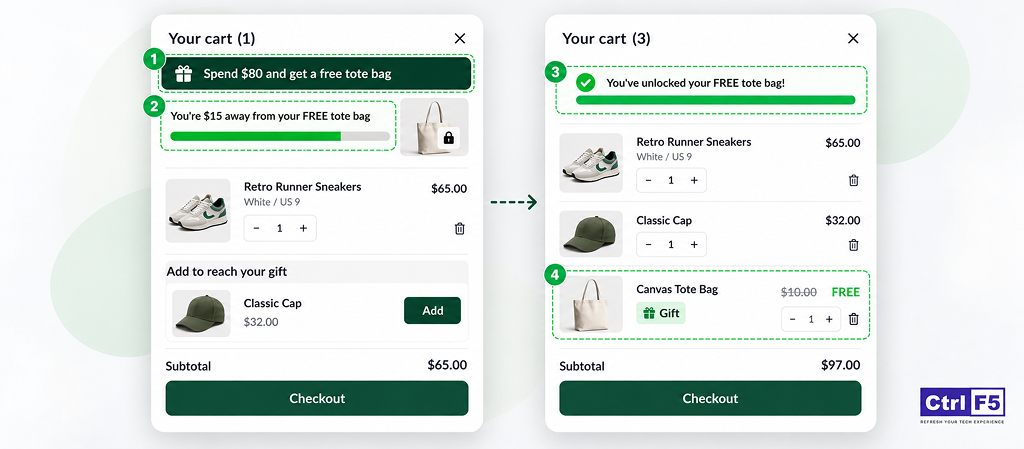
A progress bar shows customers how close they are to a reward. Something like:
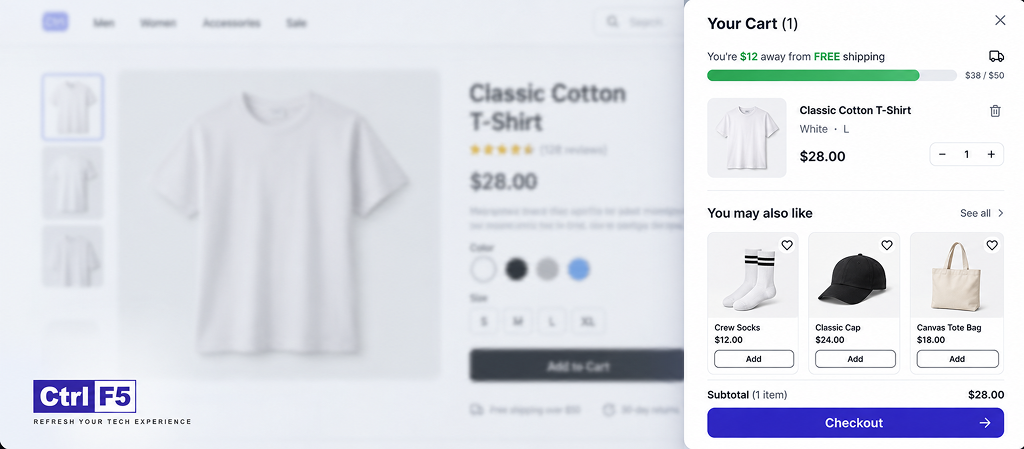
“You’re $12 away from FREE shipping.”
Once they cross it, it changes to:
“You’ve unlocked free shipping! Add $25 more for a free gift.”
This small line of text does a lot of work. It turns a hidden offer into a clear goal. People like finishing things, and a bar that’s 80% full makes them want to fill the rest.
A progress bar works best when paired with a Shopify cart upsell in your cart drawer. The customer sees they’re $12 short, and right below it, there are a few relevant products in the $10 to $20 range. That makes it very easy to add one.
Showing the same “bestsellers” to every customer is better than nothing, but it’s not ideal. The best recommendations change based on what’s in the cart.
For example:
Shopify has basic built-in product recommendations, and many Shopify upsell apps let you set rules like “if product A is in the cart, show product B.” You can start with simple manual rules for your top 10 to 20 products. That alone covers a big share of orders for most Shopify stores.
If you want more control over these rules, take a look at some of the Best product recommendation Shopify apps.
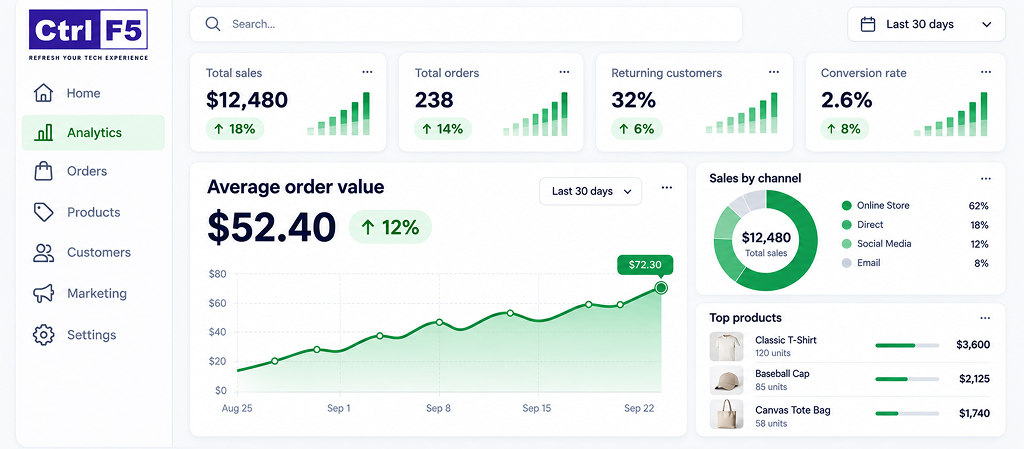
Making changes without tracking them is just guessing. Here’s how to keep an eye on your Shopify AOV:
1.Go to Analytics in your Shopify admin.
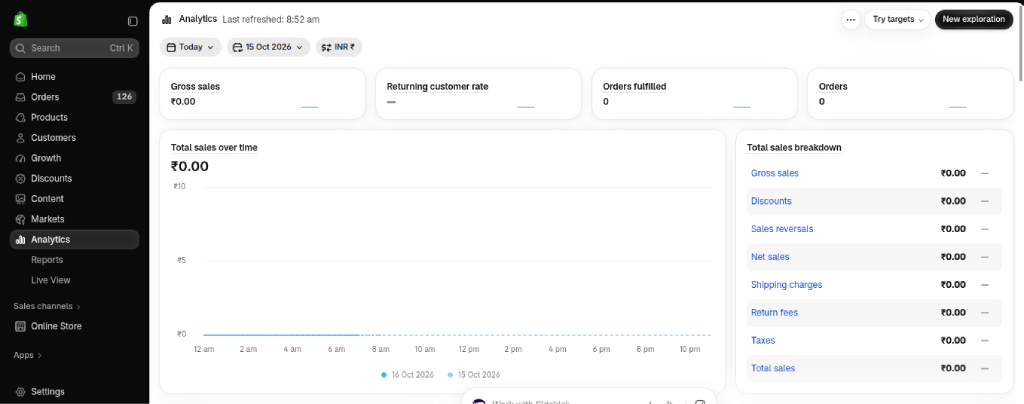
2.On the main dashboard, you’ll see an Average order value card. This gives you a quick look for the date range you pick.
3.For more detail, go to Analytics > Reports and search for the average order value report. This shows how your AOV changes over time.
4.Use the compare option to check your numbers against the previous period.
A few habits that help:
If you want upsells in the cart, proper bundles, or a rewards progress bar, a Shopify app is the quicker and cleaner way to get there, and most of them don’t need any coding.
Here are the Shopify apps worth looking at:
| Shopify App | What It Helps With |
| UpCartAOV | Cart drawer upsells, product page recommendations, free shipping and discount progress bar, free gift with purchase, shipping protection, order notes and secure checkout badges |
| Rebuy Personalization Engine | Personalized product recommendations and cart upsells |
| ReConvert | Post-purchase upsells and thank-you page offers |
| Frequently Bought Together (by Code Black Belt) | Amazon-style product pairings on product pages |
| Kaching Bundles | Bundles and quantity-based discounts |
| Zipify OneClickUpsell | One-click upsells before and after checkout |
Whichever Shopify app you pick, here’s what I’d check before installing:
And please don’t install five Shopify upsell apps at once. They often clash, slow the Shopify store down, and bombard customers with pop-ups. Pick one or two that cover your main needs.
A low average order value is rarely a product problem. In most cases, the Shopify store just isn’t giving customers a reason or an easy way to add more.
If I had to pick where to start, I’d do this:
These small changes add up. Even a $5 to $10 increase per order can improve average order value and boost Shopify revenue in a big way over hundreds or thousands of orders.
Want a bigger AOV from every order?
Let our Shopify experts review your Shopify store and show you what to fix.
Answer: Set a free shipping threshold slightly above your current AOV, add relevant upsells in the cart, and offer bundles or quantity discounts.
Answer: Divide total revenue by the number of orders. For example, $10,000 from 200 orders gives an AOV of $50.
Answer: Yes. Free shipping thresholds, free gifts, and relevant product suggestions can raise AOV without cutting prices.
Answer: Not if they’re relevant and easy to skip. Pushy pop-ups and random suggestions are what hurt conversions.
Answer: Simple changes like a free shipping threshold can show results in a couple of weeks. Give each change 2 to 4 weeks before judging it.


Is your Shopify store struggling to rank on Google? Discover common SEO problems affecting visibility and learn how to identify and fix indexing, technical, and content issues.
Is your Shopify store loading slowly? Explore 11 hidden causes that affect website speed and learn how to fix common performance issues.
In this blog, I am sharing the BFCM strategies 2026 and offer tips that I have seen work again and again.